
YouTube Thumbnail Downloader – Save Thumbnails in HD
YouTube Thumbnail Downloader makes it easy to retrieve and save the preview image associated with a YouTube video. Paste a video’s URL into the tool, preview the available thumbnail, and save the image directly to your device. It is useful for creators reviewing thumbnail designs, marketers researching videos, designers collecting visual references, and anyone who simply needs an image from a YouTube page.
You can download the thumbnail from a URL without downloading the entire video, installing software, or taking a screenshot.
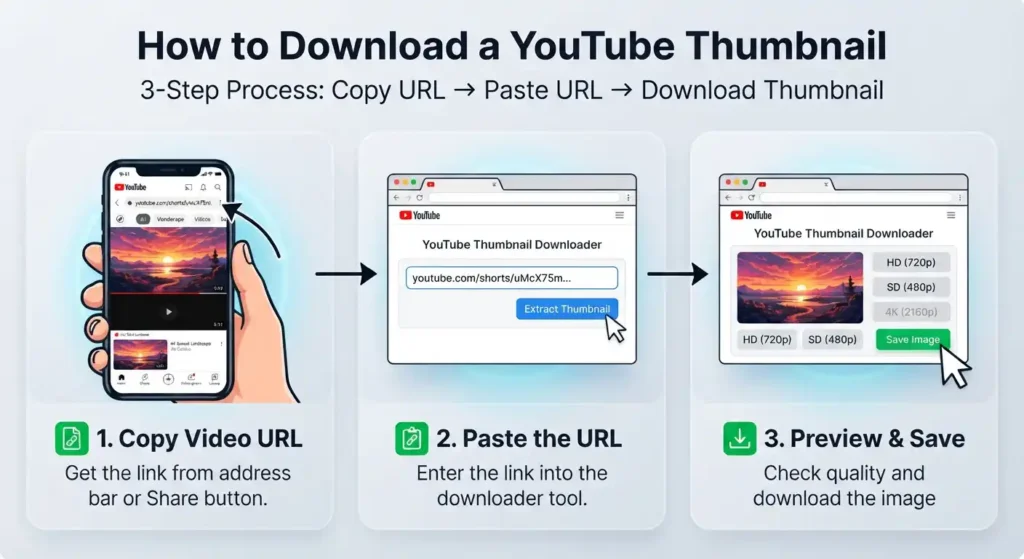
How to Download a YouTube Thumbnail
If you are wondering how to download a YouTube thumbnail, the process is simple:
| Copy the video’s URL | Open the YouTube video and copy its link from the address bar or the “Share” option. |
| Paste the URL | Paste the copied link into the downloader above. |
| Start the extraction | Click the button to process the link and extract the thumbnail information. |
| Image preview | Check the thumbnail returned by the tool before saving it. |
| Choose the available quality | Select the version that best suits your needs if multiple options are provided. |
| Save the image | Download the thumbnail to your phone, tablet, or computer. |
You do not need to download the video first. The tool works with the video link and retrieves the associated video preview image separately.
Thumbnail Quality – HD and 4K
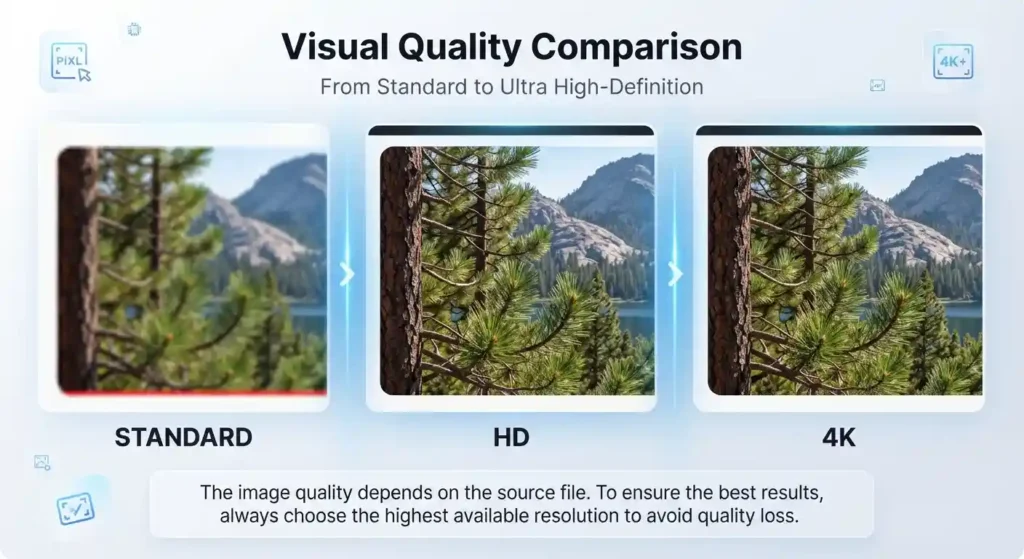
The resolution of thumbnails can vary across YouTube videos. Some videos have larger images suitable for HD viewing, while others only display smaller versions. The tool can only retrieve the image quality that is actually available in the source.
If an HD version is available, you can choose it instead of saving a smaller preview. A 4K thumbnail is also possible for videos where there is a genuine high-resolution source, but you should not expect 4K for all videos.
For best results, select the highest-quality thumbnail available rather than assuming that every image will have the same dimensions. Enlarging a low-resolution file does not create any genuine additional detail, so the original available resolution is the most reliable quality you can achieve.
Who Uses a YouTube Thumbnail Downloader
Different users need YouTube thumbnails for various practical reasons, and downloading the image directly can save time.
Content creators can use the tool when analyzing how thumbnails are presented in videos within the same niche. It offers a quick way to review existing visual approaches without having to save the entire video.
Marketers can collect examples of thumbnails while researching competitors’ channels or planning campaigns. Viewing several thumbnails side by side can reveal common visual patterns, themes, and presentation styles
Designers can retrieve a thumbnail as a visual reference when examining composition, typography, image placement, or overall layout. The downloaded file is easier to inspect than an image surrounded by a webpage interface.
Everyday users may simply want to save YouTube thumbnail images for personal reference. A straightforward tool comes in handy when the thumbnail itself is all they need.
Common Use Cases
Competitor Research
Thumbnail research can help you compare how different channels present similar topics. You can collect individual images and examine differences in text placement, subjects, framing, and visual emphasis without downloading the associated videos.
Content Planning and Design Reference
Saving thumbnail examples helps when planning future videos and reviewing design decisions. You can examine the layout, typography, spacing, and composition directly from the downloaded image. This makes it easier to explore a visual approach without relying on a small YouTube preview.
Personal Use
Sometimes, you simply want to save a specific thumbnail image for future reference. Downloading a thumbnail image gives you the image itself instead of requiring you to save the entire video or web page.
Tool vs. Screenshot
Directly downloading thumbnails is generally cleaner than taking a screenshot of the YouTube page. A screenshot may include browser controls, video controls, page elements, or surrounding content, and may capture the image at a reduced screen size.
A downloader retrieves the thumbnail itself, making it easier to save the actual image without unwanted interface elements. It also eliminates the extra step of cropping that is usually required after taking a screenshot.
Works With YouTube Shorts Too
You can use the tool with compatible YouTube Shorts by copying the Short’s URL and pasting it into the input field. The process is the same as for retrieving a thumbnail from a standard video.
Shorts may behave differently with regard to thumbnails depending on the video and how its image is made available. If a thumbnail is accessible, the tool can retrieve the available image for viewing and saving.
Frequently Asked Questions
Download Your Thumbnail
Your next thumbnail is one paste away. Paste the video link into the tool above, choose the highest available quality, and save the image in seconds—no need to download the video.