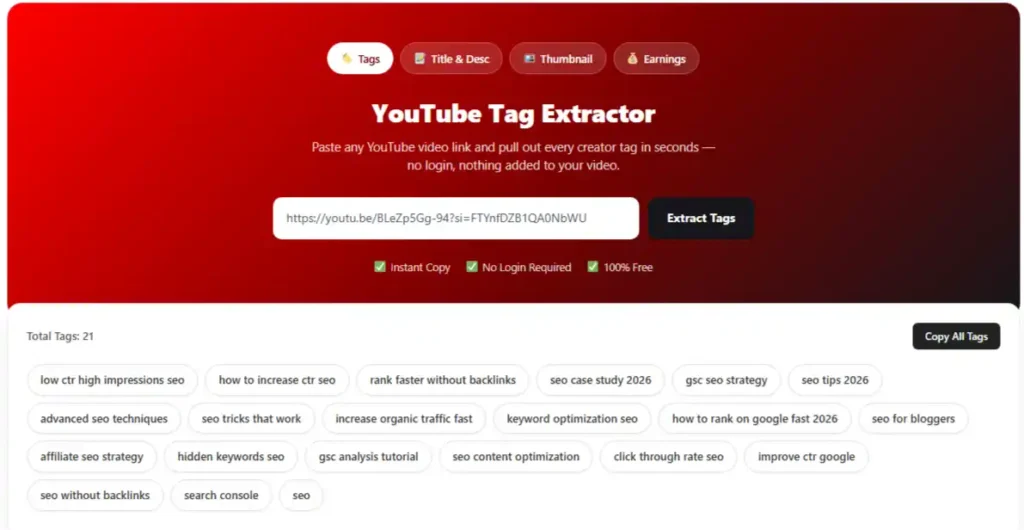
YouTube Tag Extractor – Find and Copy Video Tags Easily
.Use it as both a YouTube tag extractor and a YouTube tag generator: pull the tags that are already working on top-ranking videos in your niche, then turn those insights into a smarter, more complete tag list for your own video
What are the YouTube tags?
YouTube tags are short keyword phrases a creator adds in the “Show more” section of YouTube Studio when uploading a video. They’re not visible on the video page itself, you won’t see them sitting under the title the way you see a description, but they’re embedded in the page’s metadata, and YouTube’s system reads them.
Their job is narrow but useful: they help YouTube’s search and recommendation engine understand context, especially when a title or description is ambiguous, uses slang, or could be misspelled. A video titled “Apple Event Reaction” could be about the tech company or the fruit, tags like apple keynote, iphone launch, or tech news remove that ambiguity fast.
Tags are not a ranking silver bullet. YouTube has said publicly that watch time, click-through rate, and viewer satisfaction carry far more weight. But tags still matter for two real reasons: they help disambiguate content, and they can catch misspellings or alternate names people search for that your title and description don’t cover.
5 Steps For Choosing Best YouTube Tags
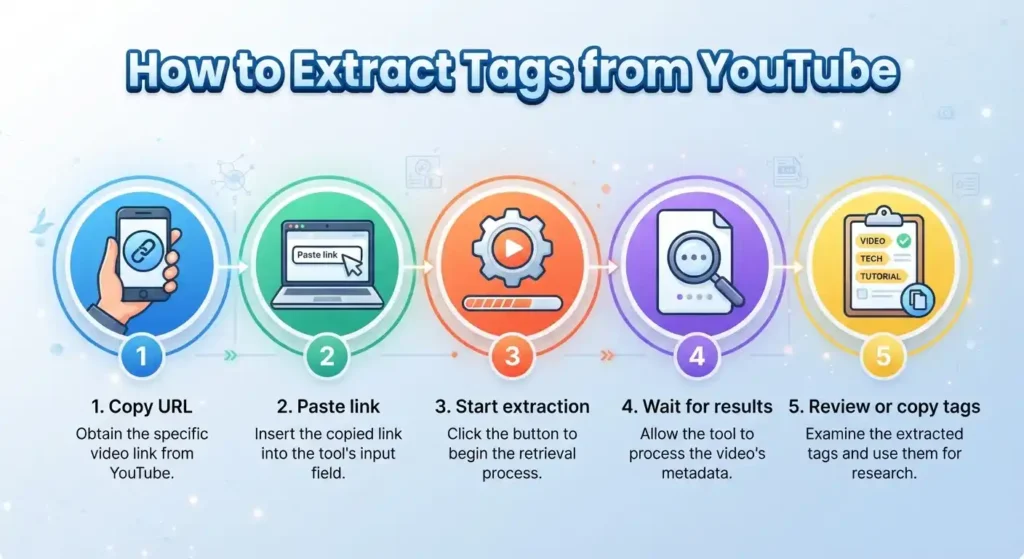
The process is simple:
- Start with your primary keyword.
Use the exact phrase someone would type into YouTube search to find your video, this should also live in your title and description. - Add close variations and misspellings.
Cover how people phrase the same idea differently (“how to tag on youtube,” “youtube tagging,” “tag someone on youtube”). - Include your channel or brand name.
This helps YouTube associate the video with your channel and can support suggested-video placement on your own content. - Extract and study tags from top-ranking competitor videos.
This is where a tags extractor tool earns its keep, you can see, in seconds, what successful videos in your niche are actually using. - Trim the list down to what’s genuinely relevant.
More tags isn’t automatically better. A tight list of 8–15 highly relevant tags outperforms 30 loosely related ones, because irrelevant tags can confuse YouTube’s categorization instead of helping it.
The tool handles the retrieval process and displays the available results in one place, making it more convenient when you need to analyze multiple videos.
Why Use A YouTube Tags Extractor?
Because guessing wastes time, and copying blindly can hurt you. A tags extractor shows you the actual metadata decisions successful creators in your space have already made, tested, live, and ranking, instead of leaving you to brainstorm keywords from scratch.
It’s also the fastest way to audit your own channel. Pull tags from your last ten uploads and you’ll often spot the problem immediately: duplicate tags across every video, tags that don’t match the content anymore, or missing brand terms that should be on everything you publish.
How To Research YouTube Tags From Other Videos
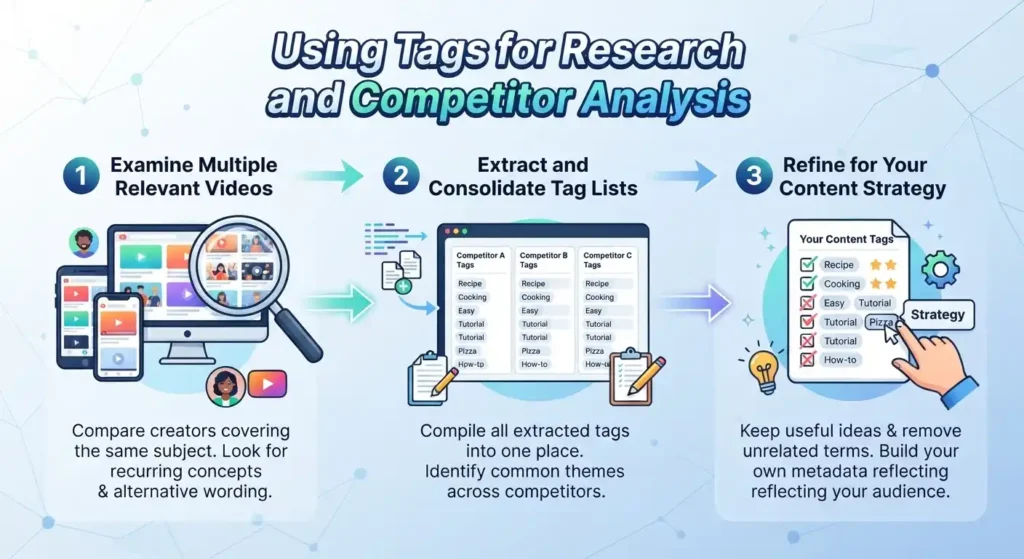
1. Inspect Relevant Videos In Your Niche
Pull up the top three to five ranking videos for the search term you’re targeting and run each one through the extractor. Patterns show up fast, the tags that repeat across most of the top results are usually the ones carrying real weight for that topic.
2. Look For Ideas, Don’t Just Copy Everything
Copying a competitor’s entire tag list word-for-word is a common mistake. Some of their tags will be irrelevant to your specific video, and using them can work against you rather than for you. Treat an extracted list as a menu of ideas, not a template to paste in unedited.
3. Include Useful Brand And Spelling Variations
Look for how creators handle brand names, product names, and commonly misspelled terms. If you notice a tag like youtube seo sitting next to youtube s.e.o or you tube seo, that’s a signal people search it multiple ways — worth covering more than one variant.
4. Generate Additional Ideas From Your Own Topic
Once you’ve studied what others use, round out your list with tags specific to your video that competitors might have missed, a unique angle, a tool you used, a specific question you answered. This is where extraction turns into generation: you’re not just copying, you’re building a better, more complete list than anyone you researched.
Is The YouTube Tag Extractor Free?
Yes. Extracting tags from any public YouTube video is completely free, with no account, no signup, and no limit on how many videos you check. You can run it as many times as you need while researching a niche or auditing your own uploads.
What Is The Tag Relevance Score?
The Tag Relevance Score is a quick rating attached to each extracted tag showing how closely it matches the video’s actual title, description, and overall topic. Instead of dumping a raw list of keywords and leaving you to guess which ones matter, the score gives you a fast way to tell a genuinely useful tag apart from filler.
A high score usually means the tag is specific, directly on-topic, and likely to have real search volume behind it. A low score often flags something generic (like a single common word), unrelated to the video’s actual content, or added purely as a broad catch-all.
How To Use Tag Relevance Scores
Keep Tags That Clearly Describe The Video
Prioritize tags with strong relevance scores that describe exactly what happens in the video, the topic, the format, and any specific names, tools, or terms mentioned.
Remove Redundant Or Off-Topic Tags
If two tags mean essentially the same thing, keep the higher-scoring one and drop the other. Cut anything scoring low that doesn’t actually connect to your content, those tags dilute your metadata rather than strengthening it.
Don’t Automatically Reject Every Lower Score
A lower relevance score doesn’t always mean “delete.” Broad category tags (like your general niche, e.g. personal finance on a budgeting video) will naturally score lower than a hyper-specific tag, but can still help with categorization. Use judgment, not just the number.
Give The Tool Better Metadata
Relevance scoring works off your video’s existing title and description, so the sharper those are, the more accurate the scores will be. A vague title makes it harder to tell which tags genuinely fit.
Can Extracting Competitor Tags Help You Get More Views?
It can help indirectly, but it’s not a direct view lever on its own. What competitor tag extraction actually gives you is a shortcut to understanding how your niche is being categorized and searched. That insight helps you write more accurate, more complete metadata, which in turn helps YouTube match your video to the right search queries and suggested-video slots.
Views still come down to the video itself, the thumbnail, the title’s click appeal, and whether people stick around and watch. Tags support discoverability; they don’t substitute for a good video.
More YouTube Tag And Metadata Tools
Pair the tags extractor with the rest of your metadata workflow:
- Pair the tags extractor with the rest of your metadata workflow:
- YouTube Tag Generator — build a tag list from scratch based on a topic or target keyword.
- YouTube Title Generator — craft click-worthy, search-friendly titles.
- YouTube Description Generator — write descriptions that reinforce your target keywords.
- YouTube Hashtag Generator — find relevant hashtags separate from your tag list.
- YouTube Channel Tag Extractor — pull tags across an entire channel at once for deeper competitor research.
When tags are not returned
Start by verifying that the link you provided points to the correct video and that the page is publicly accessible.
If nothing appears, the relevant information may not be available through the current extraction method. Video restrictions, deleted content, technical changes, or differences between pages may affect the result.
an empty response should be treated as a retrieval constraint rather than definitive proof that no tags exist.
Frequently Asked Questions
More YouTube Tools
Researching a video often involves more than just its tags. You can also explore related tools to extract titles and descriptions, find video keywords, or check other available YouTube metadata. Using the right tool for each type of information keeps your research organized, rather than trying to make a single tool handle unrelated tasks.
YouTube’s guidance on video descriptions
Find Useful Video Tags
Do you have a YouTube video you want to research? Use the YouTube Tag Extractor to review available terms, compare relevant videos, and identify language worth exploring further. Keep the useful ideas, ignore anything unrelated, and build your own metadata around the content you actually publish.