How to Find the Best YouTube Tags for Your Videos 2026
Many creators spend hours adding keywords to their videos, only to see little improvement in their search visibility. The reason is simple: YouTube tags provide only a small amount of context, while factors such as relevance, viewer engagement, CTR (click-through rate), and watch time play a much more important role in discovery. The key is knowing how to use the best YouTube tags properly without relying on them as a shortcut to better rankings.
What Makes a YouTube Tag the Best?
A useful tag describes your video’s topic in a natural and specific way. It can include the main topic, closely related phrases, long-tail search queries, and common spelling variations.
For example, a video that teaches beginners how to edit Shorts could be tagged with terms such as:
YouTube Shorts editing
how to edit YouTube Shorts
Shorts video editing
editing Shorts for beginners
YouTube Shorts tutorial
These phrases have greater topic relevance than broad terms like “YouTube” or “video” because they provide more context about the actual content.
The best YouTube tags should align with the video itself and with the language your potential viewers are likely to use
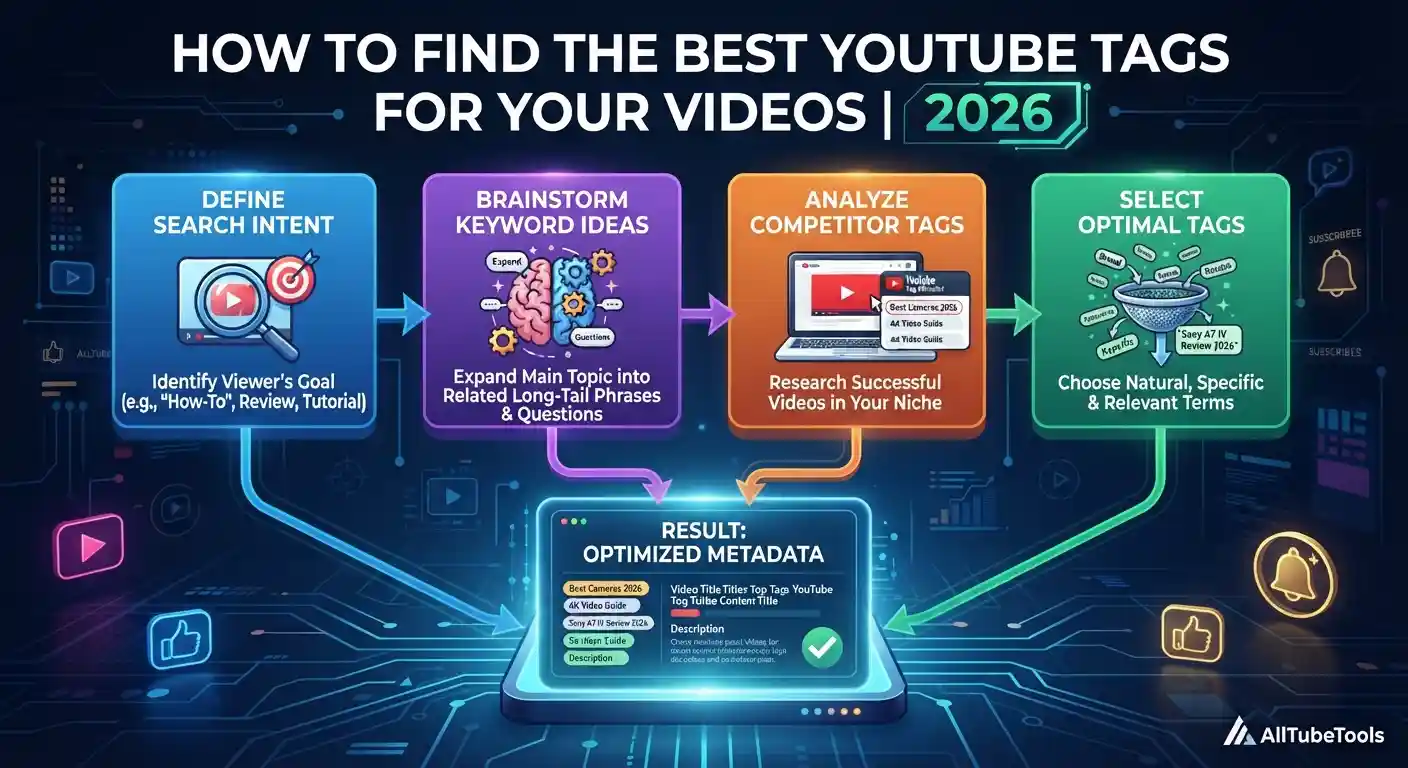
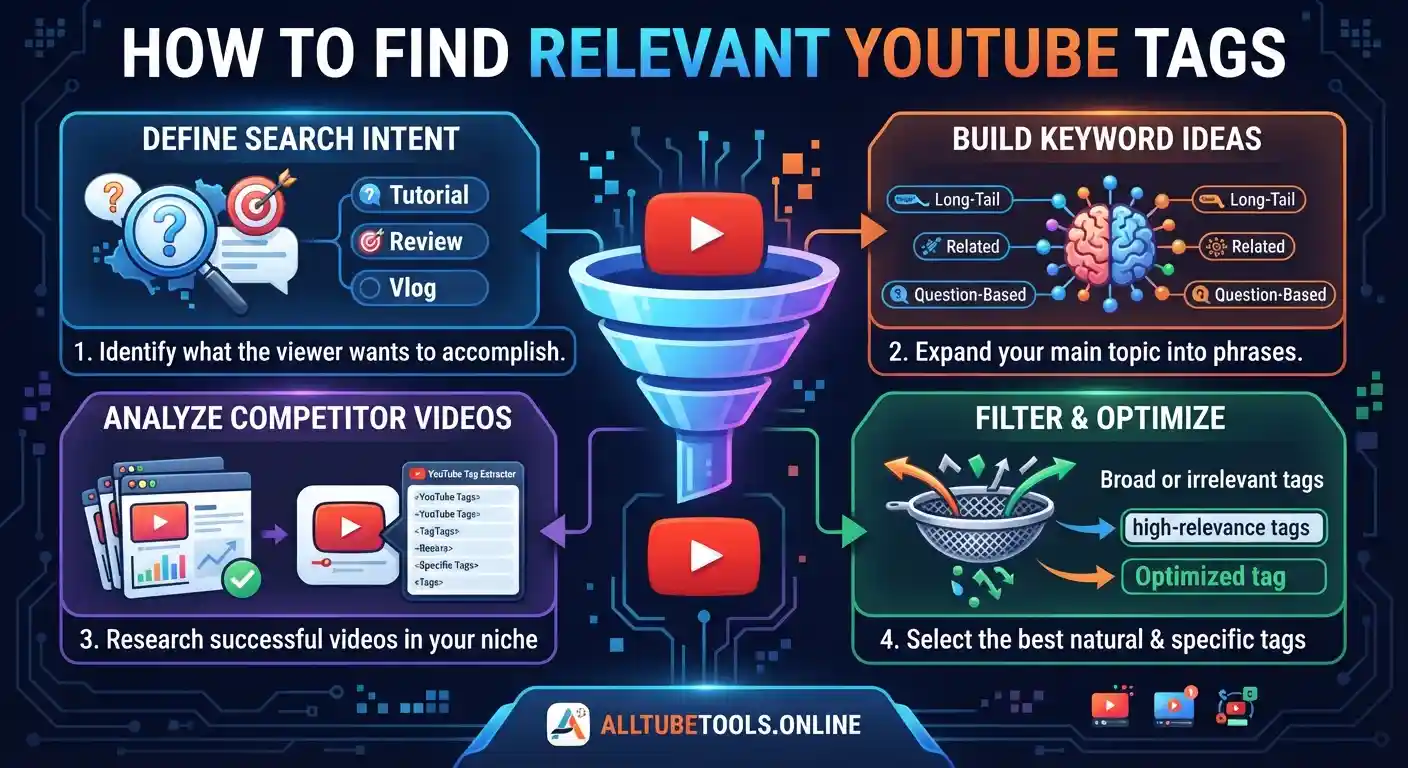
How to Find Relevant YouTube Tags
Define the Search Intent
Start by identifying what the viewer wants to achieve. Are they looking for a tutorial, a comparison, a review, an answer, an explanation, or the solution to a specific problem?
For example, someone searching for “how to edit YouTube Shorts” has a different intent than someone searching for “the best Shorts editing software.”
Understanding this distinction helps you find search terms that align with the content you actually offer.
Brainstorm Related Keyword Ideas
Take your main topic and expand it into related phrases. Look for:
Long-tail search queries
Related keywords
Question-based searches
Topic variations
Beginner-specific terms
Common terminology used within your niche
You’re looking for a natural group of terms that describe the same topic from different angles, rather than repeating a phrase with minor changes.
Analyze Relevant Videos
Look for videos that cover a similar topic and examine how successful or highly relevant creators describe their content.
Choose videos based on topic similarity rather than just views. A video with millions of views isn’t necessarily useful for your research if it targets a different audience or search intent.
A YouTube Tag Extractor can also help with this research. Enter the URL of a public video to review the available tags and identify potentially useful keyword variations. This can help you discover the best YouTube tags that are relevant to the topic you’re researching.
Use the results as research material, not as a list to copy blindly.
Filter the Results
After gathering keyword ideas, eliminate anything that doesn’t accurately represent your video.
For example, if your video explains thumbnail design, a popular term related to YouTube monetization shouldn’t be included simply because it has high search demand.
Also eliminate excessive variations that add little meaning. Your final metadata should be focused, relevant, and easy to understand.
Use Competitor Tags for Research, Not as a Shortcut
Competitor analysis is most useful when it helps you understand how a topic is described in different videos.
Compare several relevant videos and look for recurring concepts, terminology, and variations of keywords. If a phrase appears in several closely related videos, it may reveal an important aspect of the topic, but you should still adapt it to your own content.
This process can uncover semantic relationships that a single-keyword search might overlook.
For example, research on “YouTube thumbnail design” might reveal related concepts such as thumbnail size, thumbnail CTR, custom thumbnails, thumbnail templates, and click-worthy designs.
These terms help establish the topic’s context without forcing the same keyword into every sentence.
YouTube Metadata: What Matters?
Your video’s metadata should work together rather than treating tags as the primary ranking factor.
| Metadata Element | SEO / Viewer Purpose |
|---|---|
| Video Title | Communicates the main topic and matches the viewer’s query |
| Description | Adds context, explains the video, and supports topical relevance |
| Video Tags | Helps with topic variations and common misspellings |
| Thumbnail | Influences impressions and click-through rate (CTR) |
| Video Content | Delivers the information promised by the metadata |
| Spoken Words | Provides additional context that can help YouTube understand the subject |
| Captions / Subtitles | Make spoken content more accessible and provide textual context |
| Hashtags | Connect the video with relevant hashtag topics when appropriate |
| Playlist | Groups related videos and strengthens the overall content structure |
| Channel Topic | Helps establish broader topical relevance across related uploads |
| Audience Signals | Viewer behavior helps indicate whether the content satisfies expectations |
Search visibility isn’t determined by a single metadata field. YouTube needs to understand the video’s topic, while viewers need a reason to click and keep watching.
That makes search intent, CTR, watch time, viewer satisfaction, and topic relevance important parts of the overall optimization picture.
How Many YouTube Tags Should You Use?
There is no magic number of tags that will automatically improve a video’s ranking. Relevance is more valuable than quantity.
Use terms that accurately describe the video, including useful variations and common misspellings when appropriate. Avoid filling the field with unrelated popular search terms or dozens of nearly identical phrases.
YouTube’s official guide states that tags play a minimal role in discovery and are primarily useful for helping with common misspellings. YouTube Help: Add tags to videos
Your main effort should be focused on creating useful content and accurately communicating its topic through the title, description, thumbnail, and other available context.
Common Mistakes to Avoid
Several mistakes can undermine an otherwise well-researched optimization strategy:
Adding unrelated trending keywords
Repeating the same phrase excessively
Copying every tag from a competitor
Targeting a keyword that doesn’t match the video
Ignoring search intent
Assuming that tags alone can secure a #1 ranking
Optimizing for clicks without delivering on the title’s promise
A high CTR can attract viewers, but if the content doesn’t meet their expectations, the initial click has limited value. The entire experience—from the search result to the viewing session—must align with the viewer’s intent.
Frequently Asked Questions
Final Relevance Check Before Publishing
Before publishing, perform a final relevance check: read your title, description, and selected tags together and ask yourself if they all describe the same problem or topic the viewer is interested in.
If so, your metadata sends a consistent thematic signal.
If a tag feels unrelated, remove it. If your title promises an answer that the video doesn’t provide, correct the content or metadata before publishing.
This simple final check is more useful than constantly adding new keywords. The goal is a clear connection between search query → video topic → viewer expectation → actual content. When your metadata stays aligned with that path, your best YouTube tags become supportive signals rather than an unnecessary jumble of keywords.